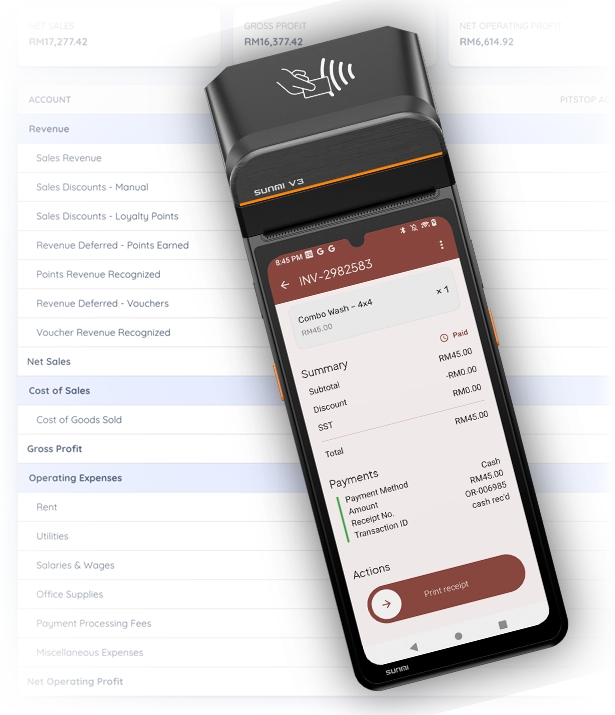
Your POS already knows every sale that happens at the counter. The books usually live somewhere else: a spreadsheet, the accountant’s office, or nowhere at all. So at month-end someone sits down and pieces them together, re-keying invoices and receipts the system already had.
The books write themselves
The moment a sale rings up, a payment lands, stock moves, or a commission is
earned, Pitstop posts it to the ledger as a balanced double-entry journal entry.
It happens in the same step as the sale, not in a separate accounting run at the
end of the month. That is why your books can never drift away from what actually
happened at the counter. Nobody exports a file, and nobody re-keys anything.
- Every sale, payment, stock movement and commission posts on its own
- Recorded as a balanced double-entry the moment it happens
- No exports, no month-end data entry
See your real profit
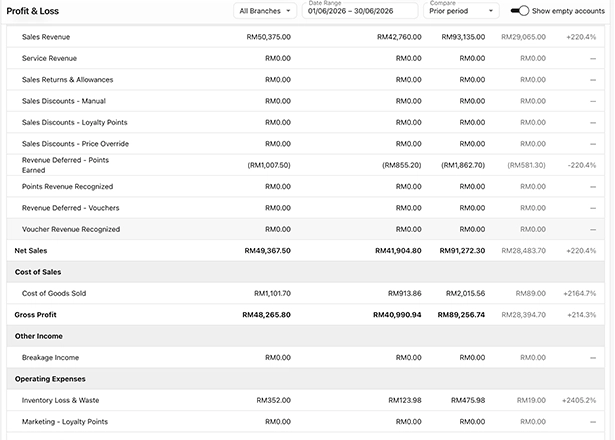
The “Profit & Loss” report lays it out the way an accountant would: revenue, cost
of sales, gross profit, operating expenses, then net operating profit. It is
accrual-based, so it counts the work you did in the period, not just the cash that
moved. Read it for one branch or consolidated across all of them, set it against a
prior period to see which way things are heading, and click any line to drill down
to the transactions behind it.
- Revenue through to net operating profit, accrual-based
- Per branch or consolidated, comparable against a prior period
- Drill from any line down to the transactions behind it
Know your true margins
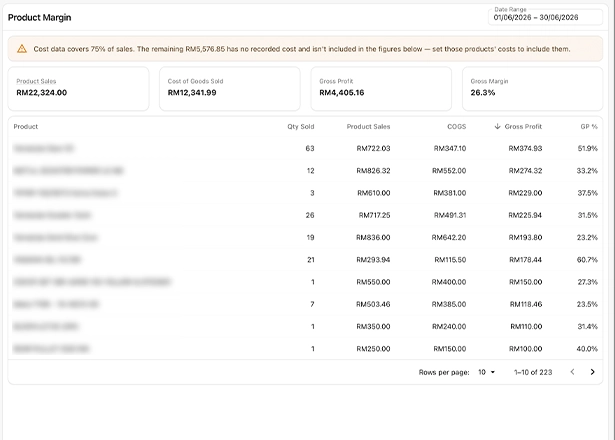
“Product Margin” shows sales, cost and gross margin for every product you sell, so
you can tell which lines actually make you money and which just keep you busy. The
cost comes straight from your inventory at weighted-average, not a figure someone
typed in. If a sale cannot be costed yet, it is flagged and left out of the margin
rather than guessed, so the number in front of you is never faked.
- Sales, cost and gross margin, per product
- Cost taken at weighted-average from your inventory
- Sales it cannot cost yet are flagged and left out, never guessed
Every expense, with the receipt attached
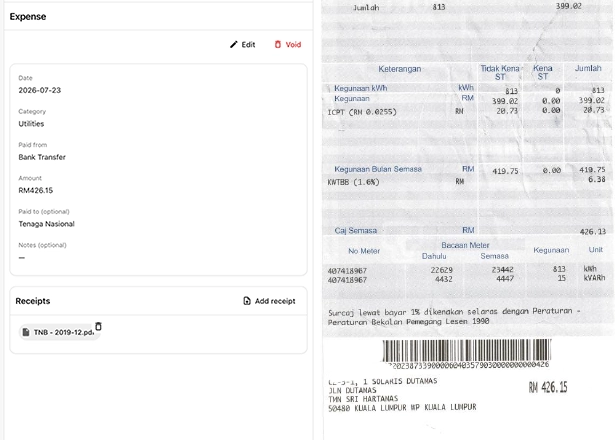
Record an expense in a few taps: pick its category, the account it was paid from
(cash, bank or petty cash), the amount and who you paid, then snap a photo or
attach a PDF of the receipt so the proof lives with the entry. Add your own
categories as you go, so the list matches how your shop actually spends. Expenses
are recorded on a cash basis, when the money goes out.
- Category, account paid from, amount and payee on every entry
- Attach a photo or PDF of the receipt to the entry itself
- Add your own categories as you go
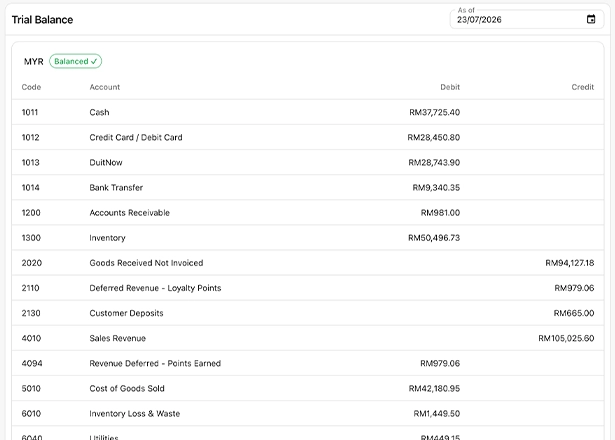
Always balanced, always auditable
Underneath everything is real double-entry bookkeeping. An entry that does not
balance is rejected, so the books are always in balance. The journal is
append-only: a mistake is fixed with a reversing entry, never a quiet edit, so the
history stays honest. Every entry is numbered and links back to the invoice,
payment or product it came from. You get a “Chart of Accounts” you can extend, a
“Trial Balance” that proves the books balance, and “Fiscal Periods” you can close
to lock a month once it is done.
- Unbalanced entries are rejected; the journal is append-only
- Corrections are reversing entries, never edits, and every entry is numbered
- Extend the "Chart of Accounts", check the "Trial Balance", close "Fiscal Periods"
Hand your accountant clean, complete records
You do nothing to keep this going. The books stay current on their own, always
balanced, and every figure traces back to a real transaction you can open. The SST
on each sale is captured in the ledger too, so what you owe stays visible. When your
accountant needs the numbers, hand them a per-customer “Statement of Account” or an
“Export for SQL Accounting” pack instead of a shoebox of receipts. The export is built
to drop straight into SQL Accounting’s own import format, with more systems on the way.
- The books stay current on their own, with no month-end assembly
- Every figure traces back to a real transaction
- Export for SQL Accounting, or share a per-customer Statement of Account
Books you can trust, without the bookkeeping
30-day money-back trial*
* Refunds cover your first month's subscription, plus hardware returned in acceptable condition.